Understanding Credit Bureaus’ Sale of Your Information and How to Opt Out!

Credit Bureaus are legally allowed to sell your information. At Reliance Bank, we assure you that we never sell customer information to other credit agencies. However, you might be concerned about your personal and financial information being sold, especially after applying for a loan, when you may begin receiving unsolicited phone calls or mail.
When you apply for credit, credit bureaus such as Equifax, Experian, Innovis, and TransUnion have the legal right to sell your information to entities offering “pre-approved” or “firm” credit options.
According to the Fair Credit Reporting Act (FCRA), Consumer Credit Reporting Companies may include your name on lists for creditors or insurers to extend firm offers of credit or insurance that you did not initiate.
Fortunately, the FCRA also gives you the right to “Opt-Out,” preventing credit bureaus from using your credit file information for these offers.
Customers can opt out by visiting http://www.optoutprescreen.com and registering on the do not call list at 1-888-382-1222 or donotcall.gov.
Mobile Banking
We have an App for That! Visit your mobile app store on your smartphone and search for the “Reliance Bank MN Mobile Banking” app. Download and sign in using your online banking credentials.
Mobile Deposit
To enroll in mobile deposit, you must first be a current online banking customer and have the Reliance Bank MN Mobile Banking App installed. Then contact a Universal Banker using the contact us form or call us at (507)331-2493 to be set up.
Card Manager
Take control over your Debit Card. Card Manager in the Reliance Bank Personal Mobile App allows you to turn your Debit Card on or off, set alerts, and limit transactions by merchant or location. For increases to Debit Card Limits, please contact a Universal Banker for assistance.
QuickBooks
QuickBooks allows you to manage your accounts on your personal computer. To download your transactions into QuickBooks, use one of the following options:
Webconnect: In Business Online, In the Account, choose the date range you wish to export. Click on the “Export as QBO” box. If the “Export as QBO” is not displayed, choose the “Change export format” link and then choose to export as QBO.
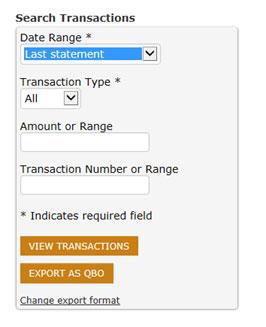
Then name and save the file on your computer.
Launch QuickBooks.
Under the Banking tab on the top of the screen, choose Bank Feeds and Import Web Connect File.
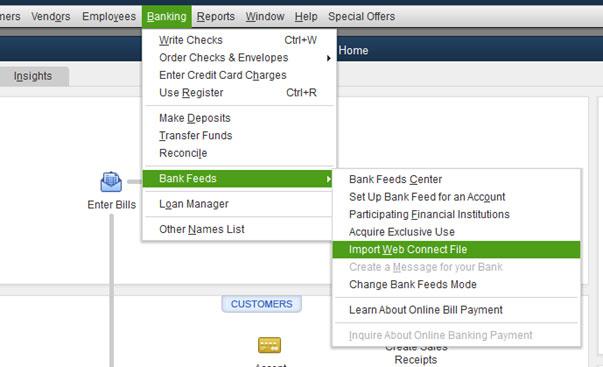
Browse to the location where you saved the export file and click open.
Choose transaction list to view the imported transactions. Under the Action column choose how to handle each transaction (add, match, ignore).
Direct Connect: Allows you to connect directly into Reliance Bank’s Online Banking system from within QuickBooks.